
Screenshots


App details
- Version
- 1.20
- Size
- 1.54 MB
- Updated
- February 13, 2019
- Requires
- Windows 2000
- Language
- English
- License
- Free
- Developer
- Imsoftxtreme
- Category
- Windows OS
SoftPas in:
This product is also available in the following languages:
About Xtreme Link Analyzer
Download Xtreme Link Analyzer – Free SEO Link Popularity Tool
Overview
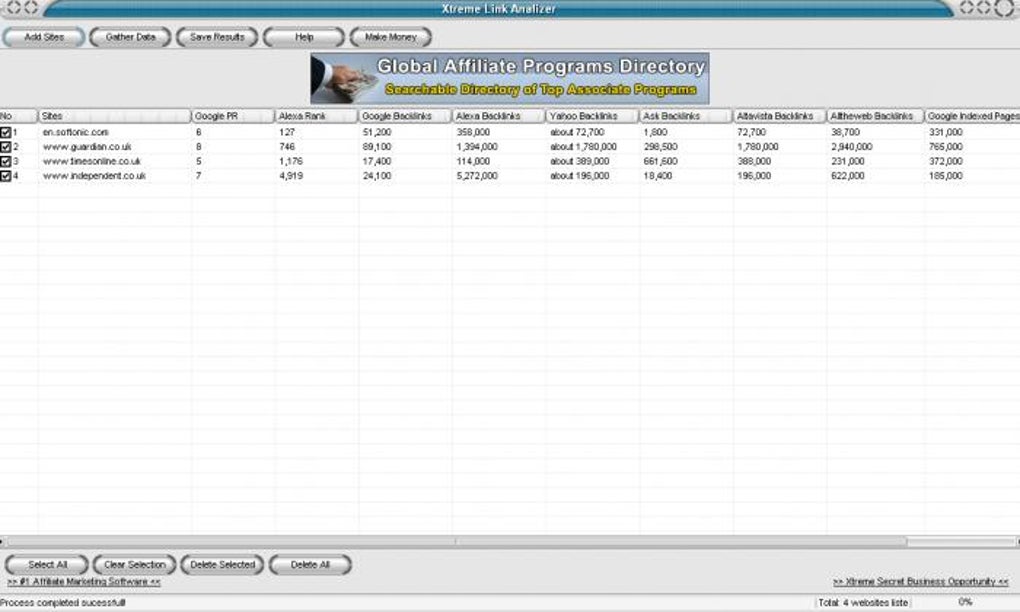
Xtreme Link Analyzer is a lightweight desktop utility designed to give website owners a quick snapshot of their site’s link popularity and how they stack up against rivals. Within seconds the program pulls data from Google’s PageRank, Alexa traffic rank, and the major search‑engine backlink indexes, then presents the numbers in a clean, numeric view. While it does not reveal the exact linking domains or the reasoning behind each ranking, it does provide enough high‑level metrics for anyone who wants to gauge the health of their SEO profile without diving into the more complex dashboards of Ahrefs, Moz or SEMrush. The tool is especially useful for small business owners, freelance marketers, and hobby bloggers who need a free, no‑frills way to monitor changes in PageRank (0‑10), Alexa rank, total backlinks, and indexed page count across Google, Bing, Yahoo, and other engines. Even though the graphical design feels dated and the navigation menu is minimal, the speed of data retrieval and the ability to compare multiple domains side‑by‑side make Xtreme Link Analyzer a handy addition to a webmaster’s toolbox.
Key Features & Installation Guide
- Instant retrieval of Google PageRank (0‑10) for any entered URL.
- Alexa traffic rank aggregation based on Alexa Toolbar usage.
- Backlink counts from Google, Bing, Yahoo, and other major search engines.
- Indexed page count per search engine to show how many of your pages are searchable.
- Support for checking multiple domains in a single session.
- Simple, single‑click “Refresh” button to update all statistics.
- Free download with optional paid upgrade for future feature expansions.
Installation & Usage Instructions
Getting Xtreme Link Analyzer up and running is straightforward. After you download the installer, double‑click the .exe (Windows) or .dmg (macOS) file and follow the on‑screen prompts. The installer creates a desktop shortcut and registers the program in the system’s start menu. First‑time launch will display a brief welcome screen where you can configure default settings such as the number of domains to keep in the history list and whether to auto‑refresh data every 24 hours. To analyze a site, simply type the full URL into the input box and press “Analyze.” Within a few seconds the tool pulls the latest PageRank, Alexa rank, and backlink totals, displaying them in a tabular format. You can switch between “Summary View” and “Detailed View” using the tabs at the top of the window. Although the application does not export results directly to CSV, you can copy the table contents manually and paste them into Excel or Google Sheets for further analysis. For power users, the program also offers a command‑line mode (available in the installation folder) that accepts a list of URLs and outputs a JSON file with all retrieved metrics.
Compatibility, Pros & Cons
Xtreme Link Analyzer is built on the .NET framework for Windows 7, 8, 10, and 11 (both 32‑bit and 64‑bit). A macOS version is available as a native Cocoa application, supporting macOS 10.13 (High Sierra) and later. While there is currently no official Android or iOS app, the desktop client can be run on Linux systems using Wine, though some UI elements may appear slightly off‑center. The software requires a minimum of 100 MB of free disk space and an active internet connection to fetch live statistics from the search‑engine APIs.
Pros
- Fast, real‑time data retrieval without the need for API keys.
- Completely free for personal use, with no hidden subscription fees.
- Lightweight installer (under 15 MB) that does not bloat system resources.
- Supports multiple domains in one session, useful for competitor analysis.
- Easy‑to‑understand numeric output, ideal for beginners.
Cons
- Lacks visual comparison graphs or trend charts over time.
- Does not list the actual backlink URLs, limiting deeper SEO insights.
- Interface feels outdated; navigation menu is basic and not customizable.
- No built‑in export to CSV or Excel, requiring manual copy‑paste.
- Only available for desktop platforms; no mobile app version.
Frequently Asked Questions
Is Xtreme Link Analyzer really free?
Yes, the core application is completely free for personal and commercial use. An optional paid upgrade may be released in the future to add advanced features, but the current version does not require any subscription or license key.
Can I see which sites are linking to my pages?
The free version only provides the total number of backlinks per search engine. It does not display the actual linking domains. For that level of detail you would need a dedicated backlink explorer like Ahrefs or Majestic.
How often is the data refreshed?
Data is fetched live each time you click “Analyze.” You can also enable automatic refresh every 24 hours in the settings menu, which will update all stored domains without manual intervention.
Does the tool work on macOS?
Yes, a native macOS build is provided. It runs on macOS 10.13 (High Sierra) and newer, supporting both Intel and Apple Silicon processors.
Is there any risk of my IP being blocked by Google or Alexa?
Xtreme Link Analyzer uses publicly available APIs and respects the rate limits imposed by Google and Alexa. Under normal usage (a few queries per minute) you will not encounter IP blocking. Excessive automated requests could trigger temporary throttling.
Final Verdict & Call to Action
Xtreme Link Analyzer delivers exactly what its name promises: a quick, free snapshot of a website’s link popularity. While it falls short of providing deep backlink analysis or beautiful visual trends, its speed, simplicity, and zero‑cost entry point make it a solid first‑step tool for anyone curious about PageRank, Alexa rank, and overall backlink volume. If you are looking for a lightweight desktop app that instantly tells you whether your SEO efforts are gaining traction, this software fits the bill. For power users who need granular backlink data, a more robust platform will be necessary, but Xtreme Link Analyzer still serves as a handy reference point and competitor‑watching companion. Download the installer today, run a few quick checks on your own site and a couple of rivals, and decide whether the numbers inspire you to improve your link‑building strategy.
Ready to see where your site stands? Download Xtreme Link Analyzer now and start tracking your link popularity for free.
Guides & Tutorials
How to install Xtreme Link Analyzer
- Click the Download button above.
- Once redirected, accept the terms and click Install.
- Wait for the Xtreme Link Analyzer download to finish on your device.
How to use Xtreme Link Analyzer
This software is primarily used for its core features described above. Open the app after installation to explore its capabilities.
User Reviews
No reviews yet. Be the first to share your experience.
You may also like
more
Llama 2
Free-to-use large language model As the new addition to Meta’s arsenal of langua...

NotebookLM
Revolutionizing the note-taking and idea-generation process NotebookLM is an exp...

Github co pilot
AI-inspired software development and coding platform GitHub Copilot is a browser...

Google Gemma
Google’s lightweight AI models Introducing Google Gemma , a family of cutting-ed...

AI Image Enlarger
A free app for Windows, by ai-image-larger. AI Image Enlarger is a free software...

DALL E
AI-driven text-to-image transformation engine DALL·E is a free graphic and desig...